I am looking for a tool to do BMW key programming, mileage adjustment, diagnosis.
Q: Is VVDI2 can do these function ?
A: No, Better buy seprately devices.
VVDI2 for key programming, Digimaster 3 for odometer correction, BMW ICOM for diagnosis.
VVDI2 Key Programmer functions:
1.Incudes all VVDI functions,Tango function,remote control generation and chip identification is improved,and also the coil's stablility has been enhanced.
2.No Need to connect VVDI2 with computer or other devices to identify chip or detect remote frequently.
3.VVDI2 Covers all the functions of VVDI,VVDI 5th Immo Adapter,BMW multi tool,CAS Plus,CAS4 Adapter,Tango,J2534.
4. 5 in 1 programmer,No need to buy other Authorization.
5.Newest Version: V5.6.0
VVDI2 for BMW key programming:
Ews 1-4, cas 1-4, fem/bdc
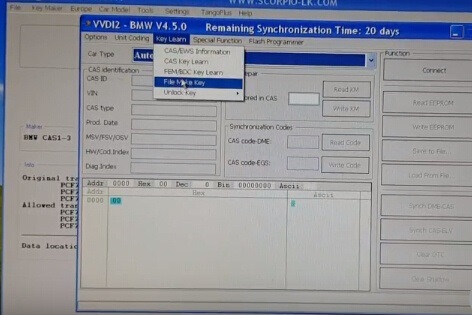
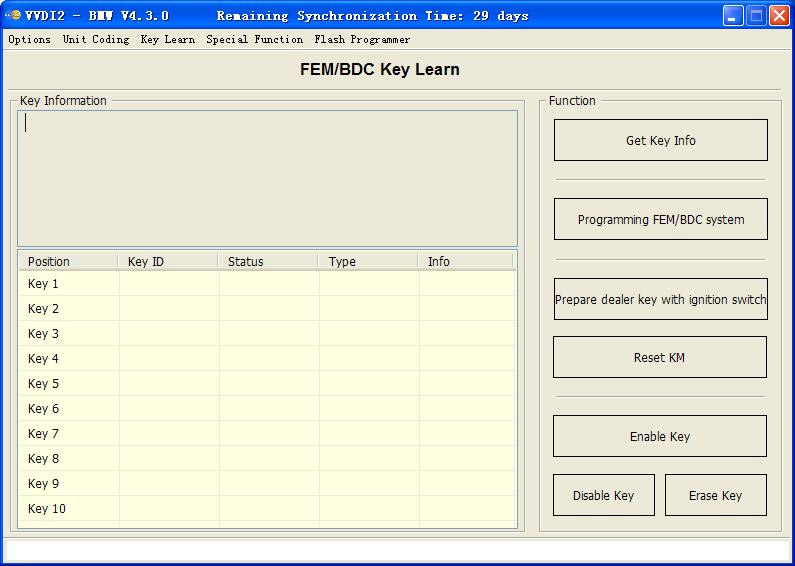
Notes:
1.backup coding and restore coding can direct operation generally.
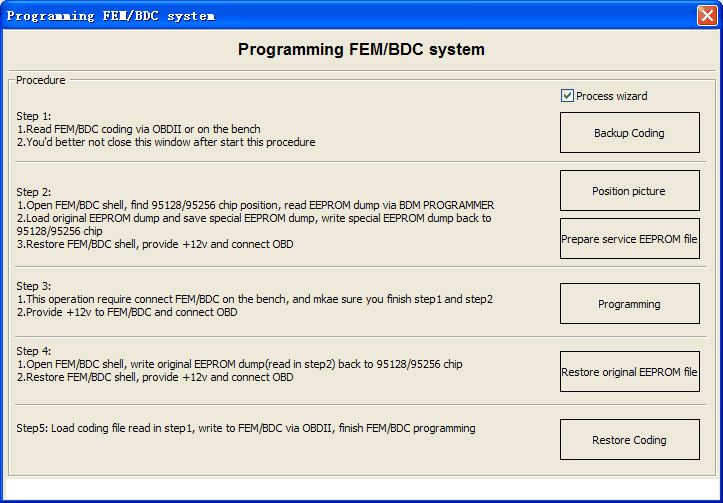
2.add keys, reset KM, erase key must programming FEM/BDC system first
3.in FEM/BDC interface, if 'get key info' the type not support, it will show:customer should use "BMW E-sys software" program FEM/BDC system.then programming FEM/BDC system with VVDI2-BMW
4.when operation on 'programming FEM/BDC system'interface,please don't close this software window until all procedures completed.
5.programming FEM/BDC system, require soldering and get eeprom.(FEM 95128 chip, BDC 95256 chip)usually there are 2 same chips on the module, please refer to the software diagram, select the correct one.
6.programming FEM/BDC system,must restore the original eeprom, restore coding.if cannot restore coding or after restore coding assemble FEM/BDC module back to car,but with problem(such as the remote control cannot start the car
or the car with window problem)please use "BMW E-sys software" coding for FEM/BDC system
7.if connect power to FEM/BDC module, but the relay keep ringing,please contact technical support for help.usually operation on FEM/BDC should be ok,just need to programming.
Digimaster 3 for odometer correction:
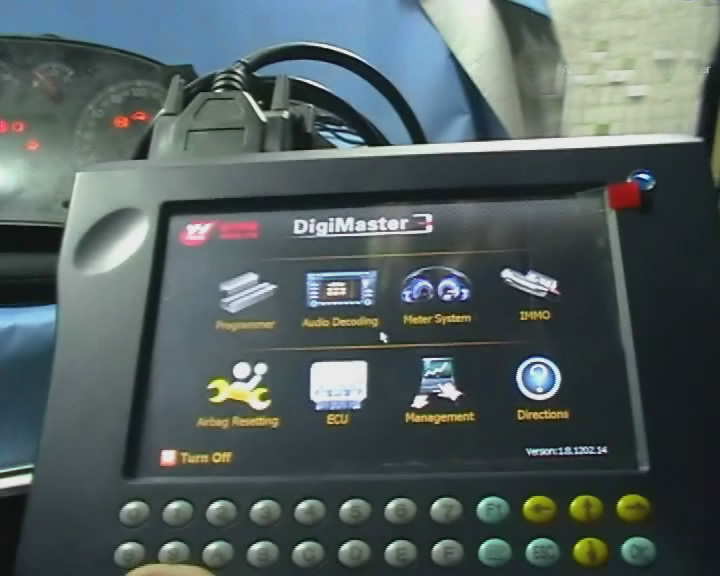
Note: Digiprog 3 vs. Digimaster 3
Both Digi3 and Digimaster should do the job. Digi3 is cheap and good, Digimaster is more like a professional tool, and of course costs much more.
BMW ICOM for diagnosis:
ISTA/D— Integrated Service Technical Application Diagnostic. ISTA/D is used to diagnose for BMW all series and models from all systems.
ISTA/P— Integrated Service Technical Application/Programming. ISTA/P is used to process all coded, programmed and enable-dependent control modules for BMW Group vehicles
KSD—for BMW KSD (Kaufmännische Service Daten, i.e. Commercial Service Data) is a collection of invaluable data for determining labor hours, inspection sheets and general service methods. There`s also information about wheels and rims for the various models.
IToolRadar— Used to recognize ICOM, activate or release ICOM Port
ETK— Accessories Catalog
INPA— Engineer Soft-ware for E series, for diagnosis
WinKFP—Engineer Soft-ware for E series, for programming
E-sys — Engineer Soft-ware for F series (available for programming and coding)
and so on……
For more details information, welcome to Add my Whatsapp (+86 18124509953 , Your Private Secretary in Car Repair Area! 16 Hours Online at your Service!
Skype : +8618124509953
Whatsapp : 0086 18124509953
Website : www.xingobd2.com
Q: Is VVDI2 can do these function ?
A: No, Better buy seprately devices.
VVDI2 for key programming, Digimaster 3 for odometer correction, BMW ICOM for diagnosis.
VVDI2 Key Programmer functions:
1.Incudes all VVDI functions,Tango function,remote control generation and chip identification is improved,and also the coil's stablility has been enhanced.
2.No Need to connect VVDI2 with computer or other devices to identify chip or detect remote frequently.
3.VVDI2 Covers all the functions of VVDI,VVDI 5th Immo Adapter,BMW multi tool,CAS Plus,CAS4 Adapter,Tango,J2534.
4. 5 in 1 programmer,No need to buy other Authorization.
5.Newest Version: V5.6.0
VVDI2 for BMW key programming:
Ews 1-4, cas 1-4, fem/bdc
Notes:
1.backup coding and restore coding can direct operation generally.
2.add keys, reset KM, erase key must programming FEM/BDC system first
3.in FEM/BDC interface, if 'get key info' the type not support, it will show:customer should use "BMW E-sys software" program FEM/BDC system.then programming FEM/BDC system with VVDI2-BMW
4.when operation on 'programming FEM/BDC system'interface,please don't close this software window until all procedures completed.
5.programming FEM/BDC system, require soldering and get eeprom.(FEM 95128 chip, BDC 95256 chip)usually there are 2 same chips on the module, please refer to the software diagram, select the correct one.
6.programming FEM/BDC system,must restore the original eeprom, restore coding.if cannot restore coding or after restore coding assemble FEM/BDC module back to car,but with problem(such as the remote control cannot start the car
or the car with window problem)please use "BMW E-sys software" coding for FEM/BDC system
7.if connect power to FEM/BDC module, but the relay keep ringing,please contact technical support for help.usually operation on FEM/BDC should be ok,just need to programming.
Digimaster 3 for odometer correction:
| Digimaster3 BMW Car List (2000-2017 ) | ||||||
| BMW Car Model | CAS1 912DG128 (3K91D) | CAS2 9S12DG256 (2K79X) | CAS3 9S12DG256 (0L01Y) | CAS3+ 9S12XDP512 (0L15Y) | CAS4 9S12XDP512 (1L15Y) 9S12XEP100 (5M48H) | FEM |
| BMW 1 Series | 2004-2006 (E87) | 2007(E87) | 2008-2011 (E87) | 2012-2014 (F20) | ||
| BMW 3 Series | 2005-2006 (E90) | 2007(E90) | 2008-2012 (E90) | 2013-2014 (F30/F35) | ||
| BMW 5 Series | 2004-2006 (E60) | 2007(E60) | 2008-2010 (E60) | 2010-2014 (F07/F10/F11/F18) | Not available yet | |
| BMW 6 Series | 2004-2007 (E63/E64) | 2008(E63/E64) | 2009-2010 (E63/E64) | 2011-2013 (F12/F13) | Not available yet | |
| BMW 7 Series | 2001-2004 (E65) | 2004-2008 (E66) | 2009-2013 (F01/F02) | Not available yet | ||
| BMW X1 Series | 2010-2014 (E84) | Not available yet | ||||
| BMW X3 Series | 2011-2013 (F25) | Not available yet | ||||
| BMW X5 Series | 2007(E70) | 2008-2013 (E70) | 2014(F15) | |||
| BMW X6 Series | 2008-2014 (E71) | Not available yet | Not available yet | |||
| BMW Z4 Series | 2010-2013 (E89) | Not available yet | Not available yet | |||
Both Digi3 and Digimaster should do the job. Digi3 is cheap and good, Digimaster is more like a professional tool, and of course costs much more.
BMW ICOM for diagnosis:
ISTA/D— Integrated Service Technical Application Diagnostic. ISTA/D is used to diagnose for BMW all series and models from all systems.
ISTA/P— Integrated Service Technical Application/Programming. ISTA/P is used to process all coded, programmed and enable-dependent control modules for BMW Group vehicles
KSD—for BMW KSD (Kaufmännische Service Daten, i.e. Commercial Service Data) is a collection of invaluable data for determining labor hours, inspection sheets and general service methods. There`s also information about wheels and rims for the various models.
IToolRadar— Used to recognize ICOM, activate or release ICOM Port
ETK— Accessories Catalog
INPA— Engineer Soft-ware for E series, for diagnosis
WinKFP—Engineer Soft-ware for E series, for programming
E-sys — Engineer Soft-ware for F series (available for programming and coding)
and so on……
For more details information, welcome to Add my Whatsapp (+86 18124509953 , Your Private Secretary in Car Repair Area! 16 Hours Online at your Service!
Xingobd2
Email : admin@xingobd2.comSkype : +8618124509953
Whatsapp : 0086 18124509953
Website : www.xingobd2.com
评论
发表评论